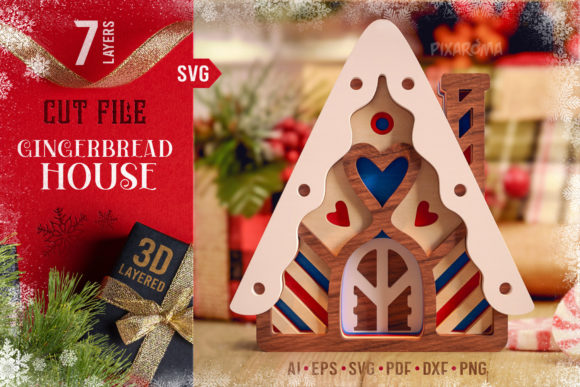
Gingerbread House 3D Layered Cut File
The holiday season demands more than just standard decorations; it requires projects that capture attention and spark conversation. The Gingerbread House 3D Layered Cut File offers a sophisticated solution for creators looking to elevate their Christmas displays beyond flat paper crafts. This digital asset is designed specifically for those who operate laser cutters, Glowforge units, Silhouette machines, and Cricut devices. By transforming a traditional two-dimensional concept into a multi-dimensional structure, this design allows users to craft a centerpiece that feels tangible, textured, and professionally finished.
Unlike simple printable templates that require folding or gluing flat pieces, this file utilizes a seven-layer architecture. Each layer is distinct, allowing for precise depth when assembled. Whether you are a hobbyist looking to create a unique gift for a neighbor or a small business owner aiming to produce high-margin seasonal items, the versatility of this SVG cut file provides a robust foundation for your creative workflow. The result is a stunning architectural model that mimics the complexity of real gingerbread structures without the mess of baking or the risk of structural collapse.
Understanding the Design Architecture
The core strength of the Gingerbread House 3D Layered Cut File lies in its specific engineering. It is not merely a collection of shapes but a sequenced assembly guide. The design includes seven distinct layers, each representing a different plane of the house, from the base foundation to the intricate roof details. This layering technique is what creates the illusion of volume and perspective.
When you download the digital package, you receive a comprehensive suite of vector files, including AI, EPS, SVG, PDF, and Stacked formats. This variety ensures compatibility regardless of your software preference or machine brand. The inclusion of raster files alongside vectors means that even if you need to adjust image density or print directly on certain materials, the file remains versatile. The stacked format is particularly useful for users who want to visualize the final order of operations before making any cuts, significantly reducing setup time and material waste.
Material Versatility and Assembly Techniques
One of the most practical aspects of this project is its adaptability to various substrates. While cardstock is the most accessible material for home crafters, the design shines when used with wood, acrylic, or thick chipboard. The assembly process is straightforward but requires attention to detail to maintain the intended aesthetic.
For cardstock layers, the key to achieving the "pop" effect is spacing. You must use double adhesive foam dots, tabs, or specialized tape to create separation between each layer. If you skip this step and glue layers directly together, you lose the height and the 3D look that defines the design. The gap created by the foam spacers allows light to pass through the structure, casting interesting shadows that enhance the visual appeal of the gingerbread house.
If you are working with wood or acrylic, the approach shifts slightly. In these scenarios, you can utilize acrylic, foam, or wooden spacers to maintain the necessary distance between layers. Alternatively, for thin materials where spacers might be overkill, you can use glue, but be aware that this will compress the design. To maximize the three-dimensional impact, maintaining consistent spacing across all seven layers is critical. The provided guide ensures that you stack the layers in the correct order, preventing confusion during the assembly phase.
Practical Applications Across Industries
The utility of this digital file extends far beyond personal home decor. Its professional-grade quality makes it suitable for a wide range of commercial and educational applications.
- Commercial Production: Entrepreneurs and Etsy sellers can leverage this file to create high-value physical products. Since you have the rights to sell the physical projects made from this design, it serves as an excellent source of passive income during the winter months. The 3D nature of the product allows for premium pricing compared to standard flat ornaments.
- Educational Projects: Educators and makerspaces can use this project to teach students about geometry, spatial reasoning, and the principles of layering. The step-by-step nature of the build encourages patience and fine motor skills development.
- Marketing and Branding: Businesses can use these houses as custom branded gifts. By adjusting colors or adding subtle branding elements to the layers, companies can distribute memorable holiday tokens that stand out against generic store-bought items.
- Event Decor: Wedding planners and event designers can incorporate these houses into table centerpieces or photo booth backdrops. The layered depth adds a dynamic element to photography that flat cutouts simply cannot achieve.
Why Choose a Digital Layered Approach?
In an era where digital downloads are ubiquitous, the value proposition of a layered cut file is its ability to bridge the gap between virtual design and physical reality. Traditional gingerbread houses require hours of baking, cooling, and decorating, often resulting in edible treats that crumble under handling. A 3D layered cut file eliminates the culinary variables entirely.
This method focuses purely on design and construction. It allows for infinite customization. You can change the color palette of every single layer to match a specific theme, such as a rustic winter forest or a modern minimalist holiday. The precision of laser cutting or die-cutting ensures that every joint fits perfectly, something that is difficult to achieve with hand-cut materials. Furthermore, the durability of materials like wood or acrylic means these decorations can be reused year after year, offering better long-term value than disposable paper crafts.
Implementation Best Practices
To get the most out of the Gingerbread House 3D Layered Cut File, proper preparation is essential. Before loading your machine, ensure that your software settings align with the thickness of your chosen material. For instance, when cutting wood, you may need to make multiple passes depending on the density of the board. When working with cardstock, a single pass is usually sufficient, but testing a small section first is always recommended.
Organization is another critical factor. Since there are seven layers, keeping track of them can become chaotic. We recommend labeling each layer immediately after cutting. Using the provided guide, arrange the pieces in order before applying any adhesive. This pre-assembly check prevents the frustration of realizing a piece is missing or misaligned once the gluing process has begun.
Finally, consider the lighting environment where the finished product will reside. The 3D layered design interacts beautifully with light. Placing the house near a window or using LED string lights inside the hollow sections can dramatically enhance the texture and depth of the layers. This interplay of light and shadow turns a static object into a living piece of art that changes appearance throughout the day.
Whether you are creating a single keepsake for your own mantle or producing a batch for a holiday market, this digital file provides the tools necessary to execute a complex design with ease. It combines the charm of a classic holiday tradition with the efficiency of modern fabrication technology, ensuring that your winter decorations are both beautiful and built to last.